---
title: Accessing Orders
description: Orders is available in the Dashboard navigation (left-most side of the webpage). Upon opening the Orders screen, you will first be prompted to select the location you wish to view orders for. Upon s
---
[Skip to content](https://help-center.readytopay.com/accessing-orders#main-content)
English
Show submenu for translations
![Ready-colour-logo-2.png\]](https://help-center.readytopay.com/hs-fs/hubfs/Ready-colour-logo-2.png?height=32&name=Ready-colour-logo-2.png)
- [Restaurants](https://help-center.readytopay.com/restaurants)
- [Stadiums](https://help-center.readytopay.com/stadiums)
- [Press](https://help-center.readytopay.com/blog)
- [Careers](https://readytopay.applytojob.com/apply)
- [Email Support](mailto://support@readytopay.com)
Open main navigation
Close main navigation
- [Restaurants](https://help-center.readytopay.com/restaurants)
- [Stadiums](https://help-center.readytopay.com/stadiums)
- [Press](https://help-center.readytopay.com/blog)
- [Careers](https://readytopay.applytojob.com/apply)
- [Email Support](mailto://support@readytopay.com)
- English
Show submenu for translations
Welcome! How can we help?
- There are no suggestions because the search field is empty.
1. [Help Center](https://help-center.readytopay.com/?hsLang=en)
2. [Ready Dashboard](https://help-center.readytopay.com/ready-dashboard?hsLang=en)
3. [Orders](https://help-center.readytopay.com/ready-dashboard?hsLang=en#orders)
# Accessing Orders
Orders is available in the Dashboard navigation (left-most side of the webpage).
Upon opening the Orders screen, you will first be prompted to select the location you wish to view orders for. Upon selecting the location you will be presented with the main Orders screen.
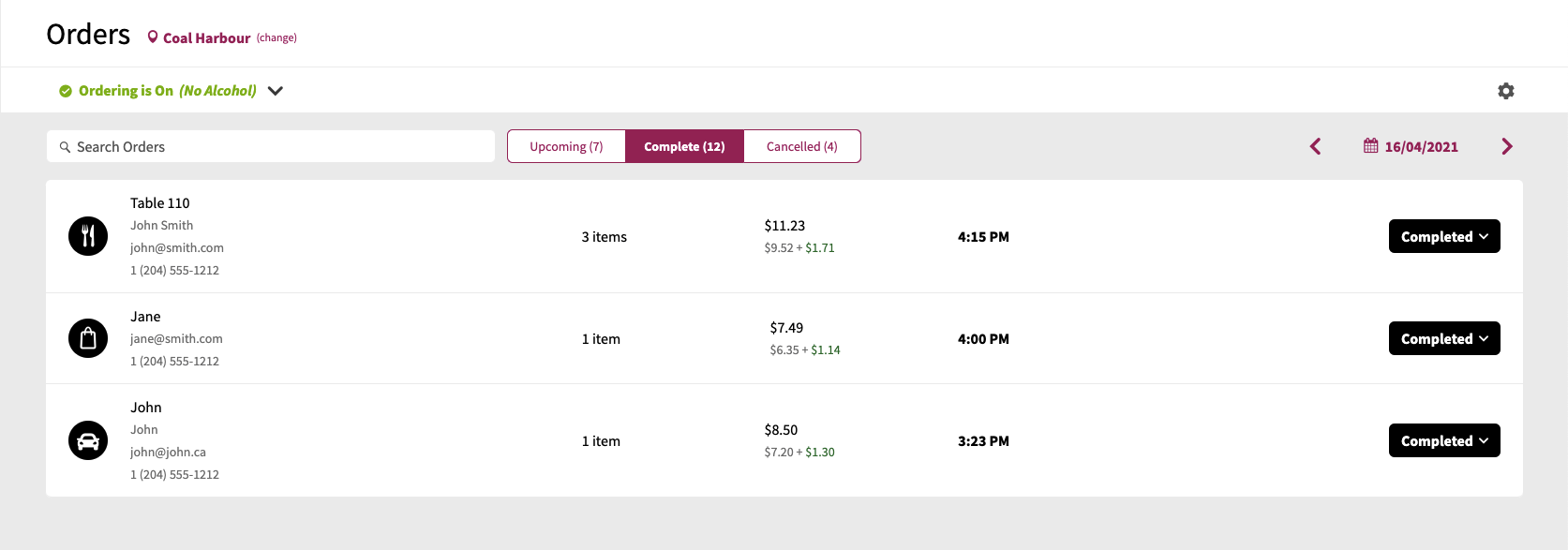
Depending on the security permissions of the security role a user is assigned to, access control to this screen is determined via the following permission:
- Orders - Full Access
For more information on available Security Roles, please see the [**Security Roles**](https://help-center.readytopay.com/ready-dashboard#security-roles) documentation.
- [Getting Started](https://help-center.readytopay.com/getting-started?hsLang=en#main-content)
- [Compatible POS Systems](https://help-center.readytopay.com/getting-started?hsLang=en#compatible-pos-systems)
- [Supported Payment Options](https://help-center.readytopay.com/getting-started?hsLang=en#supported-payment-options)
- [Ready Dashboard](https://help-center.readytopay.com/ready-dashboard?hsLang=en#main-content)
- [Reports](https://help-center.readytopay.com/ready-dashboard?hsLang=en#reports)
- [Orders](https://help-center.readytopay.com/ready-dashboard?hsLang=en#orders)
- [Server Assignment](https://help-center.readytopay.com/ready-dashboard?hsLang=en#server-assignment)
- [Users](https://help-center.readytopay.com/ready-dashboard?hsLang=en#users)
- [Security Roles](https://help-center.readytopay.com/ready-dashboard?hsLang=en#security-roles)
- [Shared Menus](https://help-center.readytopay.com/ready-dashboard?hsLang=en#shared-menus)
- [Location Menus](https://help-center.readytopay.com/ready-dashboard?hsLang=en#location-menus)
- [Schedules](https://help-center.readytopay.com/ready-dashboard?hsLang=en#schedules)
- [Tags & Badges](https://help-center.readytopay.com/ready-dashboard?hsLang=en#tags-badges)
- [Location Settings](https://help-center.readytopay.com/ready-dashboard?hsLang=en#location-settings)
- [Company Settings](https://help-center.readytopay.com/ready-dashboard?hsLang=en#company-settings)
- [Announcements](https://help-center.readytopay.com/announcements?hsLang=en#main-content)
- [Release Notes](https://help-center.readytopay.com/announcements?hsLang=en#release-notes)
- [Status](https://help-center.readytopay.com/announcements?hsLang=en#status)
- [Video Library](https://help-center.readytopay.com/video-library?hsLang=en#main-content)
- [How-to Videos](https://help-center.readytopay.com/video-library?hsLang=en#how-to-videos)
- [Webinars](https://help-center.readytopay.com/video-library?hsLang=en#webinars)
- [Troubleshooting](https://help-center.readytopay.com/troubleshooting?hsLang=en#main-content)
- [Ready Dashboard](https://help-center.readytopay.com/troubleshooting?hsLang=en#ready-dashboard)
- [Mobile App](https://help-center.readytopay.com/troubleshooting?hsLang=en#mobile-app)
- [FAQ](https://help-center.readytopay.com/faq?hsLang=en#main-content)
- [Mobile App](https://help-center.readytopay.com/faq?hsLang=en#mobile-app)
- [Transactions](https://help-center.readytopay.com/faq?hsLang=en#transactions)
- [Client Website](https://help-center.readytopay.com/faq?hsLang=en#client-website)
- [ServerFlow](https://help-center.readytopay.com/serverflow?hsLang=en#main-content)
- [ServerFlow for Tablets](https://help-center.readytopay.com/serverflow?hsLang=en#serverflow-for-tablets)
- [Restaurants](https://help-center.readytopay.com/restaurants)
- [Stadiums](https://help-center.readytopay.com/stadiums)
- [Press](https://help-center.readytopay.com/blog)
- [Careers](https://readytopay.applytojob.com/apply)
- [Email Support](mailto://support@readytopay.com)
[](https://readytopay.com/)
Copyright © 2026, Ready to Pay Software