---
title: Feedback Report
description: The Feedback report in the Ready Dashboard is where you can view guest feedback submissions for locations using the Ready Pay at Table solution. Ready offers the capability for guests to submit feed
---
[Skip to content](https://help-center.readytopay.com/feedback-report#main-content)
English
Show submenu for translations
![Ready-colour-logo-2.png\]](https://help-center.readytopay.com/hs-fs/hubfs/Ready-colour-logo-2.png?height=32&name=Ready-colour-logo-2.png)
- [Restaurants](https://help-center.readytopay.com/restaurants)
- [Stadiums](https://help-center.readytopay.com/stadiums)
- [Press](https://help-center.readytopay.com/blog)
- [Careers](https://readytopay.applytojob.com/apply)
- [Email Support](mailto://support@readytopay.com)
Open main navigation
Close main navigation
- [Restaurants](https://help-center.readytopay.com/restaurants)
- [Stadiums](https://help-center.readytopay.com/stadiums)
- [Press](https://help-center.readytopay.com/blog)
- [Careers](https://readytopay.applytojob.com/apply)
- [Email Support](mailto://support@readytopay.com)
- English
Show submenu for translations
Welcome! How can we help?
- There are no suggestions because the search field is empty.
1. [Help Center](https://help-center.readytopay.com/?hsLang=en)
2. [Ready Dashboard](https://help-center.readytopay.com/ready-dashboard?hsLang=en)
3. [Reports](https://help-center.readytopay.com/ready-dashboard?hsLang=en#reports)
# Feedback Report
*The Feedback report in the Ready Dashboard is where you can view guest feedback submissions for locations using the Ready Pay at Table solution.*
Ready offers the capability for guests to submit feedback after submitting a payment for a check at the table, where a star rating can be selected and further identification of key service areas as well as comments can be provided.
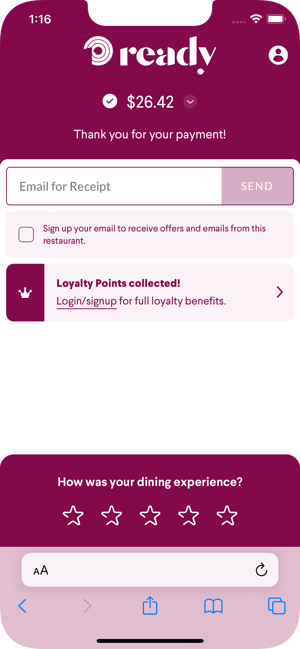 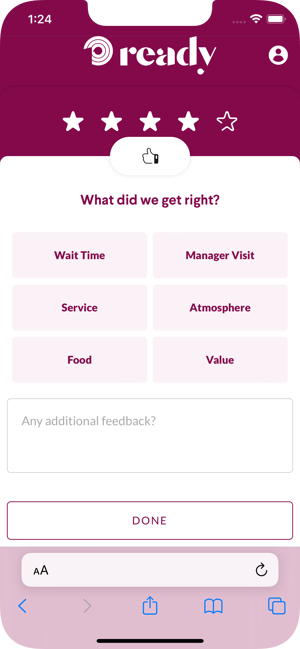
Feedback submitted by guests is available within the **Feedback** report in the Ready Dashboard.
# Accessing Feedback Report
Feedback is available in the Dashboard navigation (left-most side of the webpage). Depending on the security permissions of the security role a user is assigned to, access control to this screen is determined via the following permission:
- Reports - Feedback
For more information on available Security Roles, please see the [**Security Roles**](https://help-center.readytopay.com/ready-dashboard#security-roles) documentation.
# Feedback Report Listing
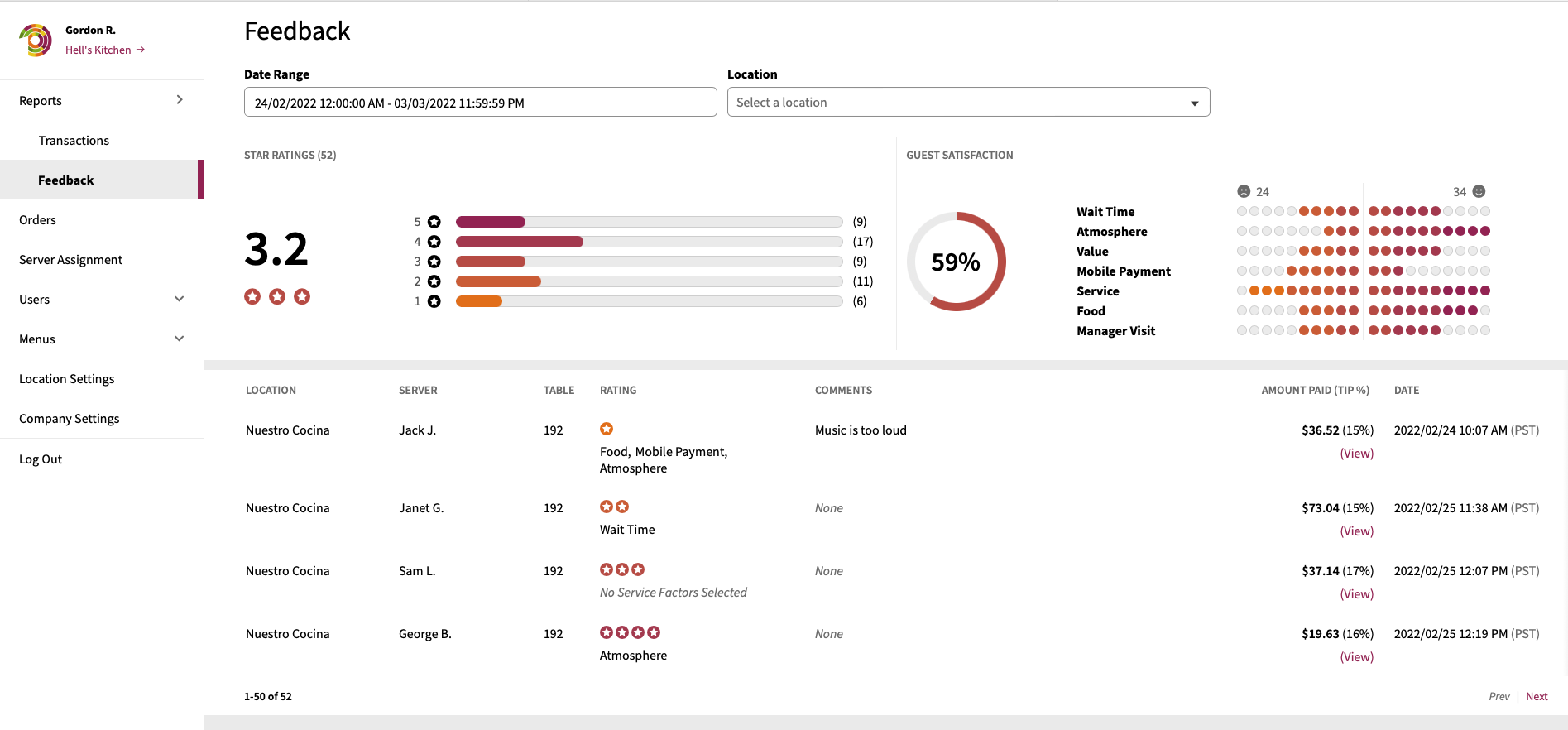
The Feedback report provides all submitted pieces of guest feedback and offers the ability to filter results based on the following:
- Date Range
- Locations
## Feedback Report Components
The Feedback report consists of three main components.
### Star Ratings
The Star Ratings panel provides an average star rating based on the feedback data and gives a breakdown of the number of feedback submissions by star rating.
### Guest Satisfaction
The Guest Satisfaction panel provides the overall guest satisfaction percentage as well as provides a histogram breakdown of each feedback area (Wait Time, Atmosphere, Value, Mobile Payment, Service, Food, Manager Visit).
### Feedback Details
A detailed listing of each piece of feedback is provided with the following information provided:
| Location | Name of the location the feedback is for. |
| --- | --- |
| Server | Name of the server associated with the feedback (pulled from the POS check data at the time of payment). |
| Table | Table guest was located at at the time of feedback submission. |
| Rating | Star rating (1-5) provided by guest and (if selected), feedback areas associated to the star rating. |
| Comments | Comments provided by the guest. |
| Amount Paid (Tip %) | Payment amount and the tip (post-tax) percentage. The **View** link can be clicked to direct you to the details of the transaction associated to the feedback. |
| Date | Date the feedback was submitted. |
- [Getting Started](https://help-center.readytopay.com/getting-started?hsLang=en#main-content)
- [Compatible POS Systems](https://help-center.readytopay.com/getting-started?hsLang=en#compatible-pos-systems)
- [Supported Payment Options](https://help-center.readytopay.com/getting-started?hsLang=en#supported-payment-options)
- [Ready Dashboard](https://help-center.readytopay.com/ready-dashboard?hsLang=en#main-content)
- [Reports](https://help-center.readytopay.com/ready-dashboard?hsLang=en#reports)
- [Orders](https://help-center.readytopay.com/ready-dashboard?hsLang=en#orders)
- [Server Assignment](https://help-center.readytopay.com/ready-dashboard?hsLang=en#server-assignment)
- [Users](https://help-center.readytopay.com/ready-dashboard?hsLang=en#users)
- [Security Roles](https://help-center.readytopay.com/ready-dashboard?hsLang=en#security-roles)
- [Shared Menus](https://help-center.readytopay.com/ready-dashboard?hsLang=en#shared-menus)
- [Location Menus](https://help-center.readytopay.com/ready-dashboard?hsLang=en#location-menus)
- [Schedules](https://help-center.readytopay.com/ready-dashboard?hsLang=en#schedules)
- [Tags & Badges](https://help-center.readytopay.com/ready-dashboard?hsLang=en#tags-badges)
- [Location Settings](https://help-center.readytopay.com/ready-dashboard?hsLang=en#location-settings)
- [Company Settings](https://help-center.readytopay.com/ready-dashboard?hsLang=en#company-settings)
- [Announcements](https://help-center.readytopay.com/announcements?hsLang=en#main-content)
- [Release Notes](https://help-center.readytopay.com/announcements?hsLang=en#release-notes)
- [Status](https://help-center.readytopay.com/announcements?hsLang=en#status)
- [Video Library](https://help-center.readytopay.com/video-library?hsLang=en#main-content)
- [How-to Videos](https://help-center.readytopay.com/video-library?hsLang=en#how-to-videos)
- [Webinars](https://help-center.readytopay.com/video-library?hsLang=en#webinars)
- [Troubleshooting](https://help-center.readytopay.com/troubleshooting?hsLang=en#main-content)
- [Ready Dashboard](https://help-center.readytopay.com/troubleshooting?hsLang=en#ready-dashboard)
- [Mobile App](https://help-center.readytopay.com/troubleshooting?hsLang=en#mobile-app)
- [FAQ](https://help-center.readytopay.com/faq?hsLang=en#main-content)
- [Mobile App](https://help-center.readytopay.com/faq?hsLang=en#mobile-app)
- [Transactions](https://help-center.readytopay.com/faq?hsLang=en#transactions)
- [Client Website](https://help-center.readytopay.com/faq?hsLang=en#client-website)
- [ServerFlow](https://help-center.readytopay.com/serverflow?hsLang=en#main-content)
- [ServerFlow for Tablets](https://help-center.readytopay.com/serverflow?hsLang=en#serverflow-for-tablets)
- [Restaurants](https://help-center.readytopay.com/restaurants)
- [Stadiums](https://help-center.readytopay.com/stadiums)
- [Press](https://help-center.readytopay.com/blog)
- [Careers](https://readytopay.applytojob.com/apply)
- [Email Support](mailto://support@readytopay.com)
[](https://readytopay.com/)
Copyright © 2026, Ready to Pay Software